Coding agents
Recent progress is driven not only by better models, but also by software systems built around them.
These systems enable LLMs to take actions rather than simply generate text.
They include general-purpose AI agents (e.g., OpenClaw) as well as specialized coding agents (e.g., Claude Code).
Terminology
There is no universally consistent naming, but a useful distinction is:
- agent → a model-driven decision-making loop
- harness → the surrounding software that provides tools, memory, permissions, and execution
- coding harness → a specialized type of harness focused on programming tasks
In practice, these terms are often used interchangeably.
Coding agents overview
A coding agent is a system that enables a LLM to perform software tasks by interacting with a real environment (file system, terminal, version control, etc.).
Instead of manually writing code, you describe a goal in plain language, and the agent plans, executes, and verifies the work.
At its core, a coding agent operates as an autonomous loop that repeatedly:
- gathers context (reads files, understands the project)
- takes action (edits code, runs commands, etc.)
- verifies results (tests, outputs, checks)
This repeating cycle, called an agentic loop, allows the system to iteratively improve its work. Each step feeds into the next, enabling self-correction and adaptation.
Depending on the system, a coding agent may have access to:
- the full codebase
- a terminal environment
- Git state (branches, commits)
- project documentation and instructions
Work happens within sessions, which may be saved or stateless, depending on the tool.
Although the agent appears to "remember" things, the underlying LLM is stateless: each request has no inherent memory of previous ones.
To compensate, the agent reconstructs context on every interaction by sending:
- conversation history
- relevant file contents
- tool outputs
- stored memory or notes
This combined input forms the context window, which acts as the agent's working memory. Since it is limited in size, the agent must manage it carefully by summarizing or discarding older information. As a result, long sessions can lead to forgotten details, repeated file reads, or reduced performance.
Actions are carried out through tools, which are the agent's interface to the external environment. The LLM itself cannot directly access files or execute commands:
- it decides what to do
- the runtime executes those actions and returns the results
A single user request can trigger many internal iterations of this loop:
- the agent sends the current context and available tools to the LLM
- the LLM decides the next action (e.g., read a file)
- the agent executes the action
- the result is fed back into the context
- the loop continues until the task is complete
Safety mechanisms are built in, such as permission modes (read-only, ask-first, or auto-edit) and checkpoints to undo changes.
The process supports a human-in-the-loop workflow:
- you can interrupt at any time
- you can provide guidance
- you can iteratively refine instructions
In essence, a coding agent is a system that:
- continuously feeds a stateless LLM with structured context
- allows it to choose actions via tools
- executes those actions
- repeats the process until the goal is achieved
Example of coding agents
Terminal coding agents:
- Aider
- Amp
- Claude Code (Anthropic)
- Codex (OpenAI)
- Gemini CLI (Google)
- Goose
- OpenCode
IDE-embedded coding agents:
Model Context Protocol (MCP)
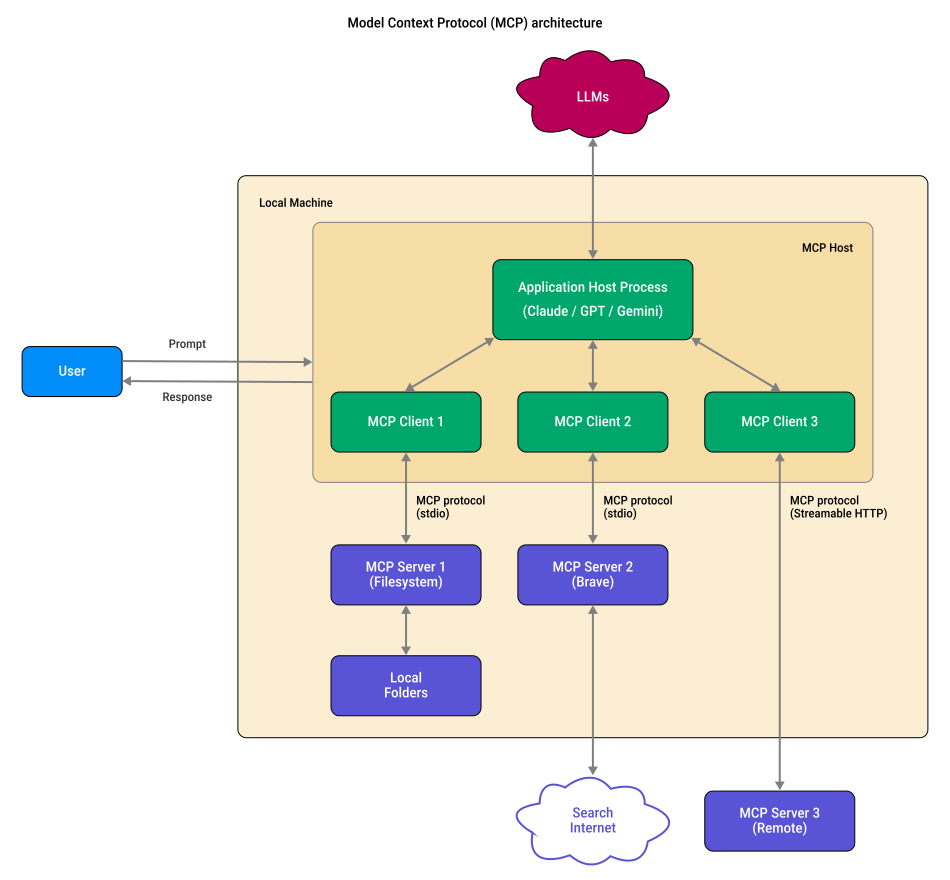
The Model Context Protocol (MCP) is an attempt to standardize how LLM applications connect to tools and external context.
Instead of building custom integrations for every tool, MCP defines a shared interface where:
- a host (an application that runs the LLM or connects to one) maintains multiple MCP client connections
- each MCP client manages a protocol session with a single MCP server
- each MCP server exposes tools, resources, and prompts
These capabilities are then aggregated by the host into a unified toolspace for the model:
 Joint
Joint