IPv6
In the early 1990s, the 32-bit IPv4 address space was running out.
To solve this, a new protocol called IPv6 (The Internet Protocol version 6) was developed.
Most important changes
- larger address space:
- IPv6 expands IP addresses from 32 bits to 128 bits
- allowing a total pool of available addresses of
2^128, or 340 "undecillion" addresses - the easiest way to envision the magnitude of this number is to picture 340 followed by 36 zeros
- support for anycast address:
- in addition to unicast and multicast addresses
- an anycast address is shared by multiple hosts
- a datagram sent to an anycast address is delivered to the topologically closest host in the group, according to routing metrics
- simplified header:
- IPv6 uses a fixed 40-byte header
- some IPv4 fields were removed or made optional
- this simplifies and speeds up router processing
- flow labeling:
- IPv6 allows labeling of packets belonging to particular flows (RFC 8200)
- a flow is a group of packets that need special handling
- this can support things like quality of service (QoS) or real-time traffic
- its use in practical deployments is limited
IPv6 datagram format
| Internet Protocol Version 6 (IPv6) | |||||||
|---|---|---|---|---|---|---|---|
| Offsets (starting positions) |
Octet | 0 | 1 | 2 | 3 | ||
| Octet | Bit | 0-3 | 4-7 | 8-11 | 12-15 | 16-23 | 24-31 |
| 0 | 0 | Version | Traffic Class | Flow Label | |||
| 4 | 32 | Payload Length | Next Header | Hop Limit | |||
| 8 | 64 | Source IP Address | |||||
| 12 | 96 | ||||||
| 16 | 128 | ||||||
| 20 | 160 | ||||||
| 24 | 192 | Destination IP Address | |||||
| 28 | 224 | ||||||
| 32 | 256 | ||||||
| 36 | 288 | ||||||
| 40+ | 320+ | Data | |||||
| Field | Description |
|---|---|
Version |
Identifies the IP version number. |
Traffic class |
|
Flow label |
Identifies a flow of datagrams. |
Payload length |
Treated as an unsigned integer giving the number of bytes of the payload. |
Next header |
|
Hop limit |
|
Source and destination addresses |
IPv6 128-bit addresses. |
Data |
Payload portion of the IPv6 datagram. |
Several IPv4 fields are no longer present in the IPv6 datagram:
- fragmentation and reassembly:
- IPv6 does not allow routers to fragment or reassemble packets
- only the sender and receiver can do this
- if a packet is too large for a link, a router drops it and sends a "Packet Too Big" ICMP message to the sender
- the sender then resends the data using a smaller packet size
- removing fragmentation from routers speeds up packet forwarding
- header checksum:
- the designers of IP felt that this functionality could be removed from the network-layer because error checking is already handled by the transport (TCP/UDP) and link layers (e.g., Ethernet)
- In IPv4, the checksum must be recalculated at every router due to changes in the TTL field
- removing it improves forwarding efficiency
- options
Transitioning from IPv4 to IPv6
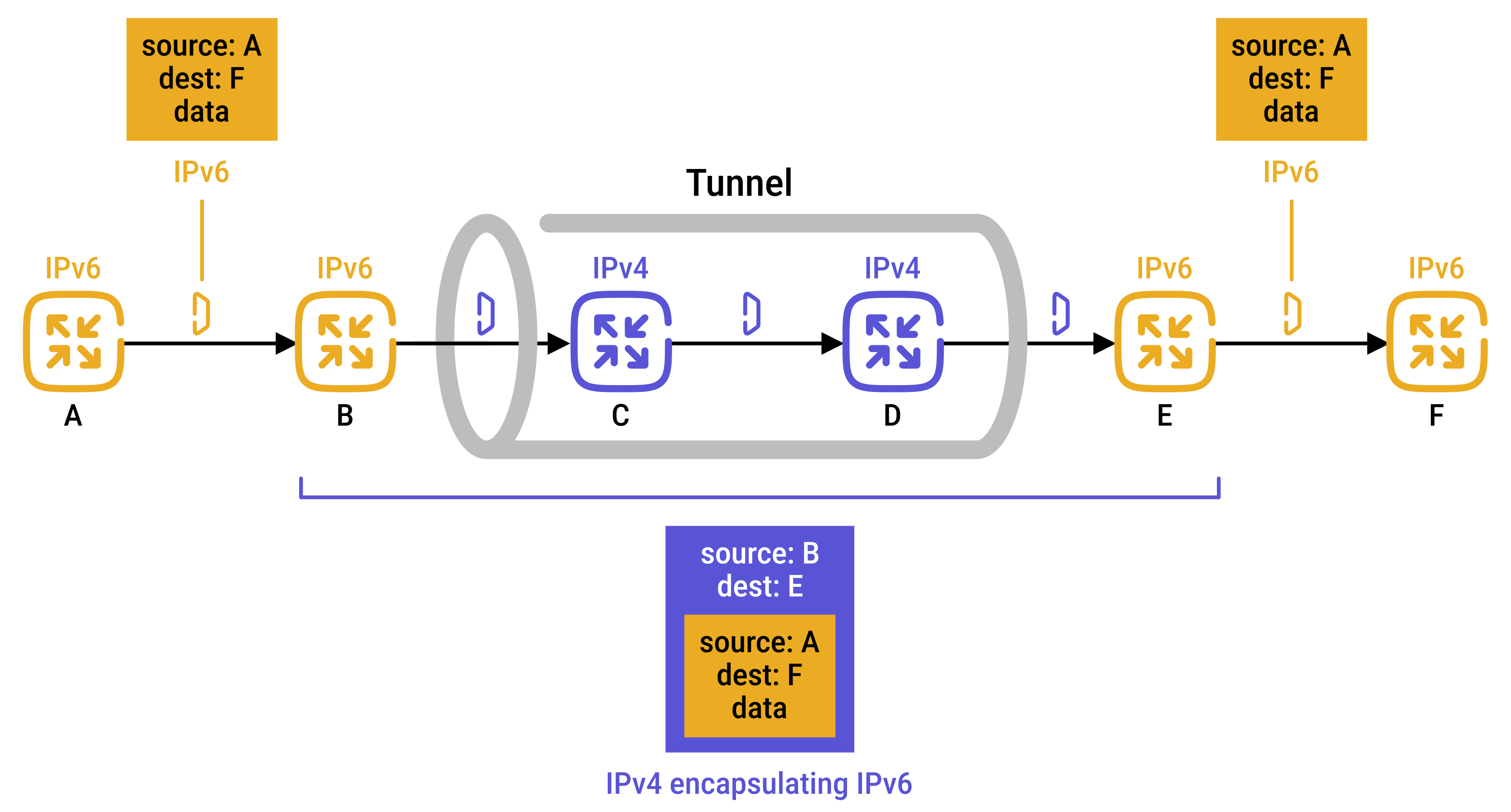
The Internet is moving from IPv4 to IPv6 using a method called tunneling (RFC 4213).
Tunneling lets IPv6 networks communicate even when traffic must pass through IPv4-only parts of the Internet:
- two IPv6 nodes want to exchange IPv6 data
- between them is an IPv4-only network, called a tunnel
- the sending IPv6 node:
- takes the IPv6 packet
- puts it inside the data (payload) field of an IPv4 datagram (encapsulation)
- IPv4 routers in the middle simply forward it like normal IPv4 traffic
- the receiving IPv6 node:
- gets the IPv4 packet
- recognizes it contains IPv6 data because the protocol number field in the IPv4 datagram is 41
- extracts the IPv6 datagram
- routes the IPv6 datagram exactly as it would if it had received the IPv6 datagram from a directly connected IPv6 neighbor
Neighbor solicitation
IPv6 does not use ARP. Instead, it uses the Neighbor Discovery Protocol, which is based on ICMPv6.
Unlike ARP, which uses broadcasts, NDP uses multicast messages:
- it reduces unnecessary traffic
- and additional functions such as router discovery, auto-configuration, and duplicate address detection
Network-layer protocols are hard to change
A key lesson from IPv6 is that changing network-layer protocols is very difficult:
- it is like trying to replace the foundation of a house
- you often can't do it without rebuilding the house or temporarily moving people out
In contrast, new application-layer protocols are easy to deploy:
- they are more like adding a fresh coat of paint
- quick to apply, and successful ideas are often copied by others
As a result, changes at the network layer happen much more slowly than changes at the application layer.
 Joint
Joint