Delay, loss, and throughput
Overview of delay
A data packet travels from a source host, through a series of routers, to a destination host.
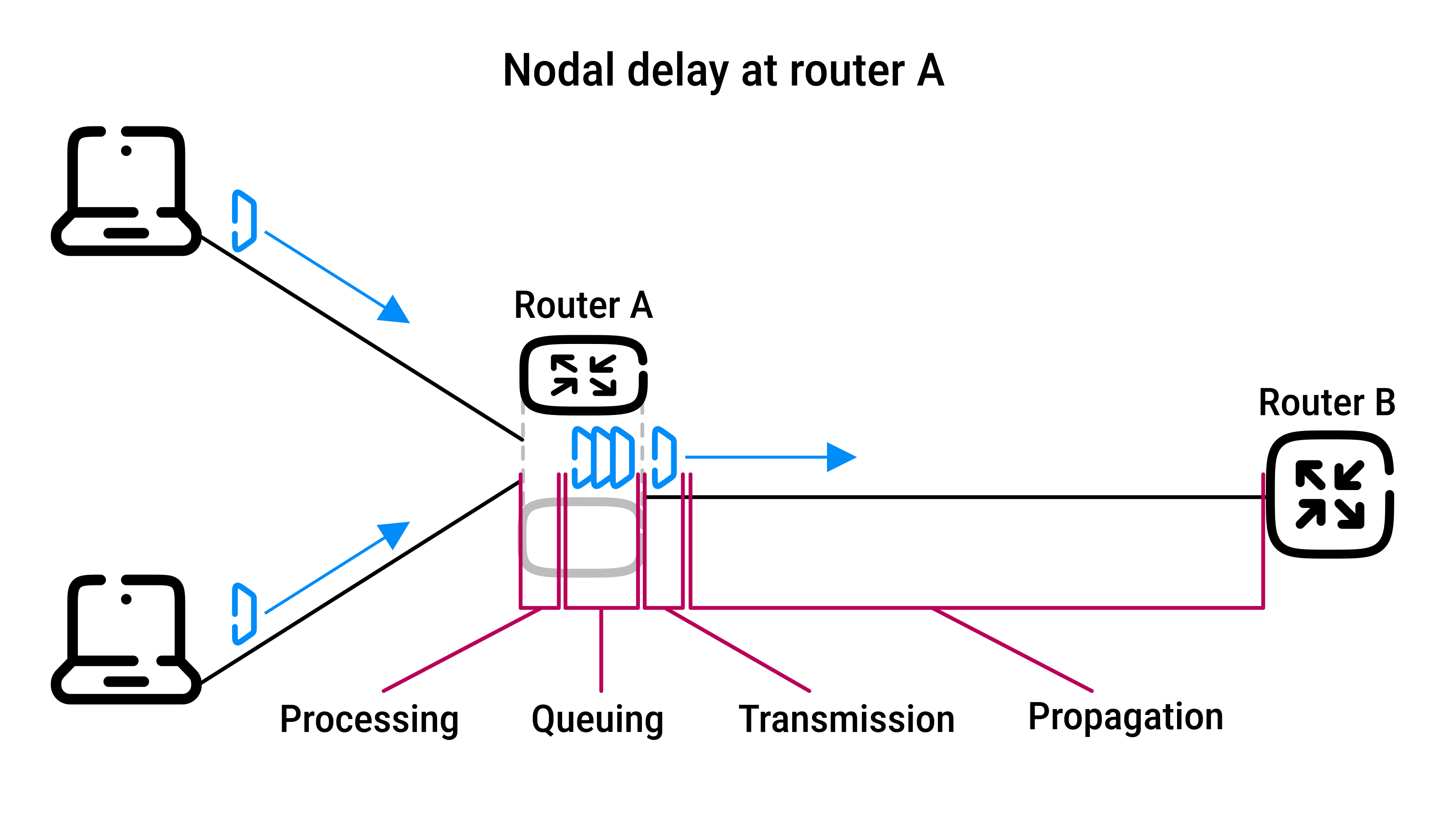
At each node (host or router), the packet experiences several types of delays:
| Delay Type | Description | Characteristics | Duration | |
|---|---|---|---|---|
| \( d_{\text{proc}} \) | Processing delay | Time to examine the packet header and determine where to direct the packet (can also include the time needed to check for bit errors) | Very short in high-speed routers | Microseconds |
| \( d_{\text{queue}} \) | Queuing delay | Time the packet waits in the buffer before being transmitted | Varies significantly based on current traffic levels | Microseconds to milliseconds |
| \( d_{\text{trans}} \) | Transmission delay | Time required to push all the packet's bits onto the link; happens before movement (transmission) | Depends on packet size and link speed; can be negligible or significant | Microseconds to milliseconds |
| \( d_{\text{prop}} \) | Propagation delay | Time it takes for the bits to travel from one router to the next; happens during movement (propagation) | Depends solely on distance and the transmission medium; bits propagate at the propagation speed of the link |
d / s, where:
|
These individual delays add up to form the total nodal delay \( d_{\text{nodal}} \), or the total delay at each node:
\[ d_{\text{nodal}} = d_{\text{proc}} + d_{\text{queue}} + d_{\text{trans}} + d_{\text{prop}} \]
Each component's contribution to \( d_{\text{nodal}} \) can vary greatly depending on context (e.g., local network vs. satellite link).
Delay components behave differently depending on the network setup:
- for high-speed LANs, transmission and propagation delays are often negligible
- for long-distance or low-bandwidth links, they can be dominant
Network delays affect the performance of Internet applications.
Queuing delay and packet loss
Queuing delay (\( d_{\text{queue}} \)) is the most complex part of nodal delay:
- it's variable and unpredictable, unlike other delays (processing, transmission, propagation)
- it depends on:
- the number of packets already in the queue
- and their arrival pattern
- because of its complexity, it's the subject of extensive academic research
Traffic intensity affects how congested the queue becomes:
- periodic arrivals (evenly spaced):
- little to no queuing
- bursty arrivals (packets arrive in clusters):
- can cause significant queuing delays
- random arrivals (real-world case):
- delay is unpredictable
Packet loss due to finite queue capacity:
- routers have limited buffer space
- when the buffer is full, incoming packets are dropped (lost)
- as traffic intensity increases, the probability of packet loss also increases
- lost packets may need to be retransmitted, affecting overall network performance
Performance metrics:
- network performance is evaluated not just by delay, but also by the likelihood of packet loss
- managing both metrics is critical for efficient and reliable data transmission
End-to-end delay
End-to-end delay:
- is the total time it takes for a packet to travel from the source host to the destination host
- includes delays from all nodes (routers) along the path
If the network is uncongested (no queuing delays), and all nodes are similar, the total delay is:
\[ d_{\text{end-to-end}} = N (d_{\text{proc}} + d_{\text{trans}} + d_{\text{prop}}) \]
Where:
- \( N \) = number of nodes (including source and destination)
- \( d_{\text{proc}} \) = processing delay
- \( d_{\text{trans}} \) = transmission delay (packet size ÷ link speed)
- \( d_{\text{prop}} \) = propagation delay
Traceroute helps understand how delays accumulate across the network:
- it sends special packets to each router along the path and receives a response from each
- it measures round-trip time to each router, allowing the user to:
- identify each router in the path
- measure delays at each step
- visualize how delay builds across the network
Real-world conditions cause variation in delays:
- round-trip times vary due to changing network conditions
- delays may not increase linearly
- later routers can have lower delays than earlier ones due to dynamic queuing
- a significant jump in delay can reveal a long-distance link
- like an undersea cable
End-system and application-level delays can also contribute to network delays:
- medium access delay:
- time spent waiting to access a shared medium (e.g., Wi-Fi)
- packetization delay (e.g., in VoIP):
- the amount of time required for a system to accumulate enough data to fill a packet before it is transmitted over the network
- especially significant in applications such as Voice over IP (VoIP)
Throughput
Throughput refers to the rate at which data is successfully delivered from sender to receiver, measured in bits per second (bps).
Bottleneck link
Throughput depends on the bottleneck link: in any data transfer path, the slowest link (lowest bandwidth) determines the maximum throughput.
| Scenario | Formula | Explanation | Illustration |
|---|---|---|---|
|
Path with two links |
\( \text{Throughput} = \min(R_s, R_c) \) |
|

|
|
Path with multiple links |
\( \text{Throughput} = \min(R_1, R_2, \dots, R_N) \) |
The slowest link ("bottleneck") limits performance |

|
Access links (e.g., home Wi-Fi or ISP connection) are usually the bottleneck.
Core network links are very fast and rarely limit throughput.
Shared link
Suppose a network with 10 clients downloading from 10 servers:
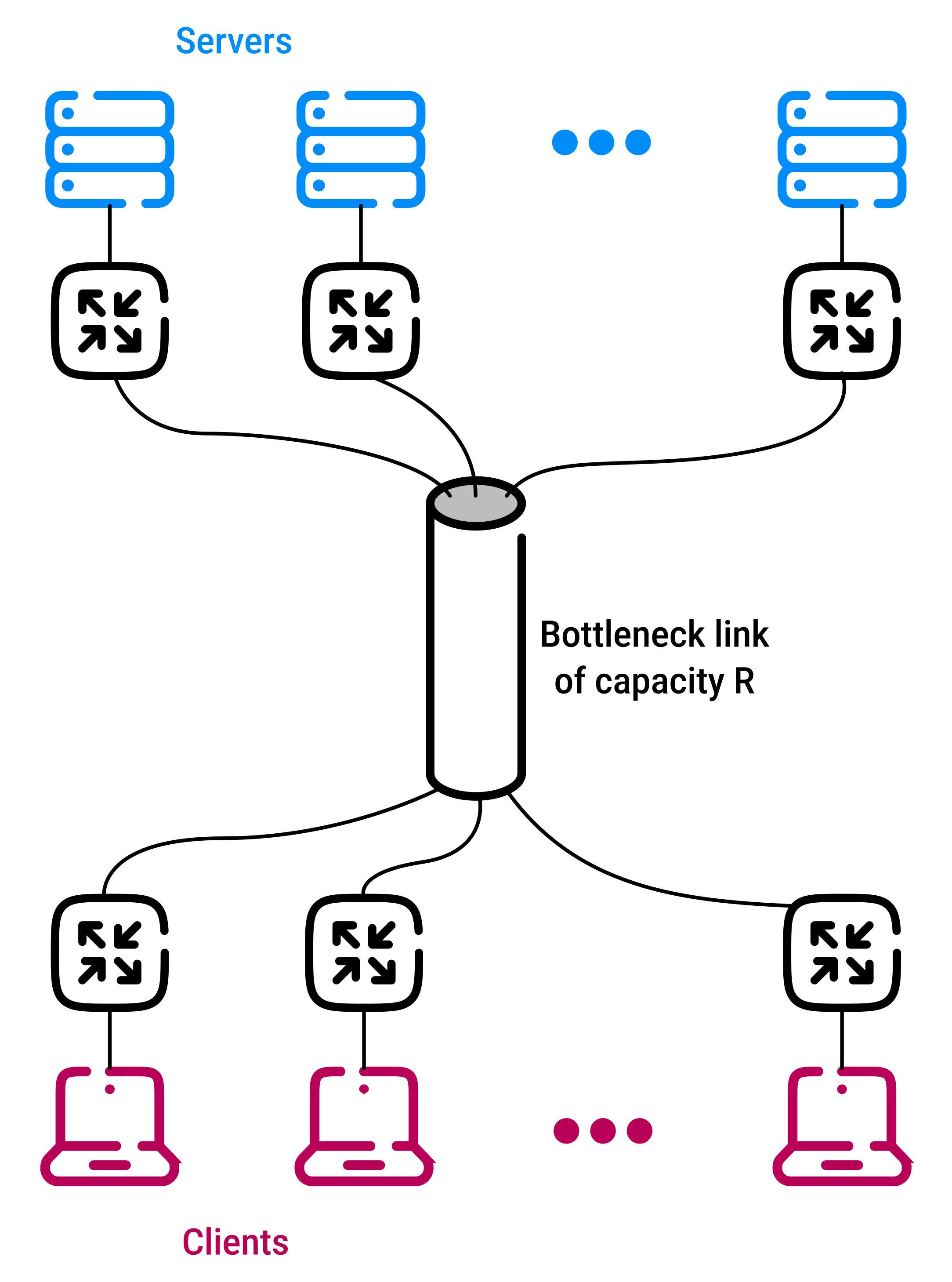
- all traffic passes through one shared core link (rate =
R) - each server and client has its own access link with rates
RsandRc
Effect of the share link on end-to-end throughput:
- if
Ris much faster thanRsandRc:- the download speed (throughput) for each client is limited by the slower of the server or client access links
- \( \text{Throughput} = \min(Rs, Rc) \)
- if
Ris similar in speed toRsandRc:- then it must be shared equally across all 10 downloads
- each download gets \( \frac{R}{10} \)
- and this shared link becomes the bottleneck
Summary
In ideal conditions with no other traffic:
- throughput = slowest link rate
In real-world conditions, throughput is limited by:
- the slowest link in the path
- the amount of competing traffic (shared usage)
 Joint
Joint