Retrospective: a day in the life of a web page request
Bob connects his laptop to his school's Ethernet switch and opens a Web page such as www.google.com.
Before the page can load, several networking protocols need to cooperate:
- DHCP gives Bob's laptop an IP address
- DNS finds the IP address of the website
- ARP finds the local router's MAC address
- TCP creates a reliable connection
- HTTP requests and transfers the web page
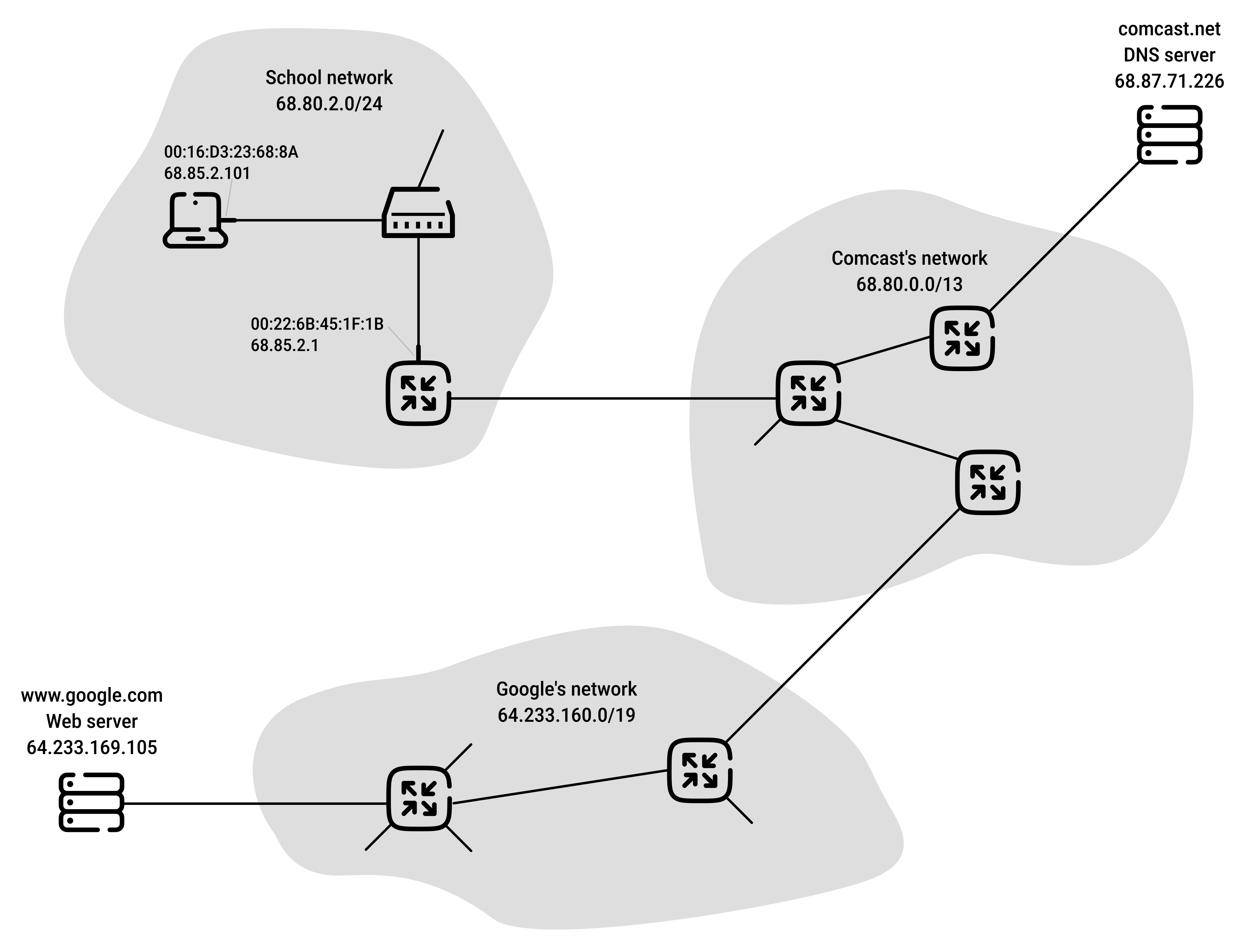
To keep things simple, we omit a number of additional protocols and considerations:
- NAT running in the school's gateway router
- wireless access to the school's network
- security protocols for accessing the school network
- HTTPS (modern websites almost always use HTTPS over TCP port 443)
- network management protocols
- Web caching
- the DNS hierarchy
1. DHCP
Bob connects his laptop to the school's Ethernet switch.
The switch connects the laptop to the school's router, which connects the school network to the ISP. In this example, the ISP (comcast.net) also provides the school's DNS service.
The laptop does not yet have an IP address, so it initiates a DHCP exchange to request network information:
The laptop broadcasts a DHCP message placed inside:
| Protocol | Destination | Source | Layer |
|---|---|---|---|
| DHCP request | DHCP server | DHCP client | Application |
| UDP segment | Port 67 (DHCP server) |
Port 68 (DHCP client) |
Transport |
| IP datagram | 255.255.255.255 (broadcast) |
0.0.0.0 |
Network |
| Ethernet frame | FF:FF:FF:FF:FF:FF (broadcast) |
00:16:D3:23:68:8A (Bob's laptop) |
Link |
Because the Ethernet frame is addressed to the broadcast MAC address, the switch floods it out all ports except the incoming one.
The router, which runs the DHCP server, receives the Ethernet frame:
- the datagram's payload (UDP segment) is extracted and demultiplexed up to UDP
- the DHCP request message is extracted from the UDP segment
The DHCP server assigns Bob:
- IP address:
68.85.2.101 - DNS server address:
68.87.71.226 - Default gateway router:
68.85.2.1 - Network prefix:
68.85.2.0/24
It sends this information back (unicast) in a DHCP reply placed inside:
| Protocol | Destination | Source | Layer |
|---|---|---|---|
| DHCP reply | DHCP client | DHCP server | Application |
| UDP segment | Port 68 (DHCP client) |
Port 67 (DHCP server) |
Transport |
| IP datagram | 68.85.2.101 (Bob's laptop) |
68.85.2.1 (router) |
Network |
| Ethernet frame | 00:16:D3:23:68:8A (Bob's laptop) |
00:22:6B:45:1F:1B (router) |
Link |
The Ethernet switch receives the Ethernet frame:
- because the switch is self-learning and previously received an Ethernet frame from Bob's laptop
- it knows to forward a frame addressed to
00:16:D3:23:68:8Aonly to the output port leading to Bob's laptop
Bob's laptop receives the DHCP ACK and stores:
- its own IP address
- the DNS server IP address
- the default gateway address where it will send all datagrams with destination address outside of its subnet
68.85.2.0/24
Now the laptop is ready to communicate.
2. DNS
When Bob types www.google.com into his browser.
The browser needs Google's IP address before it can create a TCP socket to connect.
So it needs to send a DNS query message encapsulated into an Ethernet frame.
However, the laptop knows only the router's IP address, not its MAC address.
3. ARP
Before it can send the Ethernet frame containing the DNS request, the laptop must find the router's MAC address.
It creates an ARP query request.
ARP operates at the link layer and does not use UDP or IP encapsulation, so ARP messages are carried directly inside Ethernet frames:
| Protocol | Destination | Source | Layer |
|---|---|---|---|
| ARP request | All hosts on the LAN | ARP client ("Who has IP address 68.85.2.1?") |
Link/Network |
| Ethernet frame | FF:FF:FF:FF:FF:FF (broadcast) |
00:16:D3:23:68:8A (Bob's laptop) |
Link |
The switch broadcasts this message.
The router recognizes its own IP address and replies (unicast) with an ARP reply:
| Protocol | Destination | Source | Layer |
|---|---|---|---|
| ARP reply | ARP client | Owner of 68.85.2.1 ("I am 68.85.2.1 and my MAC address is 00:22:6B:45:1F:1B") |
Link/Network |
| Ethernet frame | 00:16:D3:23:68:8A (Bob's laptop) |
00:22:6B:45:1F:1B (router) |
Link |
The frame is sent to the switch, which delivers the frame to Bob's laptop.
Now Bob's laptop knows how to send Ethernet frames to the router.
4. DNS (bis)
Bob's laptop is now able to send the Ethernet frame containing a DNS query to the gateway router's MAC address:
| Protocol | Destination | Source | Layer |
|---|---|---|---|
| DNS query | DNS server (www.google.com lookup) |
DNS client | Application |
| UDP segment | Port 53 (DNS server) |
Ephemeral port (DNS client) | Transport |
| IP datagram | 68.87.71.226 (DNS server) |
68.85.2.101 (Bob's laptop) |
Network |
| Ethernet frame | 00:22:6B:45:1F:1B (router) |
00:16:D3:23:68:8A (Bob's laptop) |
Link |
The school's router receives the DNS request:
- it examines the destination IP address:
68.87.71.226 - its forwarding table filled in by Comcast's intra-domain protocol (RIP, OSPF or IS-IS) as well as the Internet's inter-domain protocol (BGP) tells it to send the packet into the Comcast network
Routers along the way continue forwarding the packet until it reaches the DNS server.
The DNS server:
- receives the query for
www.google.com - looks up the name in its database
- returns one of the IP addresses associated with
www.google.com(e.g.,64.233.169.105)- assuming that it is currently cached in the DNS server
- this cached data originated in the authoritative DNS server for google.com
The DNS server returns a DNS reply containing the hostname-to-IP-address mapping placed inside:
| Protocol | Destination | Source | Layer |
|---|---|---|---|
| DNS reply | DNS client | DNS server | Application |
| UDP segment | Ephemeral port (DNS client) | Port 53 (DNS server) |
Transport |
| IP datagram | 68.85.2.101 (Bob's laptop) |
68.87.71.226 (DNS server) |
Network |
| Ethernet frame | 00:16:D3:23:68:8A (Bob's laptop) |
00:22:6B:45:1F:1B (router) |
Link |
This datagram is forwarded back through the Comcast network to the school's router and from there, via the Ethernet switch to Bob's laptop.
Bob's laptop extracts the IP address of the server www.google.com from the DNS message.
Bob's laptop now knows Google's IP address.
5. TCP
The browser can now contact Google's server.
The browser asks the operating system to create a TCP socket and initiate a connection to Google's server.
TCP must first perform a three-way handshake with www.google.com:
1. TCP SYN (Bob's laptop requests a connection):
| Protocol | Destination | Source | Layer |
|---|---|---|---|
| TCP SYN segment | Port 80 (Google HTTP server) |
Ephemeral port (Bob's browser) | Transport |
| IP datagram | 64.233.169.105 (Google server) |
68.85.2.101 (Bob's laptop) |
Network |
| Ethernet frame | 00:22:6B:45:1F:1B (router) |
00:16:D3:23:68:8A (Bob's laptop) |
Link |
2. TCP SYN-ACK (Google's server accepts the request):
| Protocol | Destination | Source | Layer |
|---|---|---|---|
| TCP SYN-ACK segment | Ephemeral port (Bob's browser) | Port 80 (Google HTTP server) |
Transport |
| IP datagram | 68.85.2.101 (Bob's laptop) |
64.233.169.105 (Google server) |
Network |
| Ethernet frame | Next-hop router (Google's gateway) | Google server's MAC address | Link |
3. TCP ACK (Bob's laptop confirms the connection):
| Protocol | Destination | Source | Layer |
|---|---|---|---|
| TCP ACK segment | Port 80 (Google HTTP server) |
Ephemeral port (Bob's browser) | Transport |
| IP datagram | 64.233.169.105 (Google server) |
68.85.2.101 (Bob's laptop) |
Network |
| Ethernet frame | 00:22:6B:45:1F:1B (router) |
00:16:D3:23:68:8A (Bob's laptop) |
Link |
The socket on Bob's laptop is now ready to send bytes to www.google.com.
6. HTTP
Bob's browser creates the HTTP GET message containing the URL to be fetched:
GET / HTTP/1.1
Host: www.google.com
The HTTP GET message is placed inside:
| Protocol | Destination | Source | Layer |
|---|---|---|---|
| HTTP GET request | www.google.com |
Bob's browser | Application |
| TCP segment | Port 80 (Google HTTP server) |
Ephemeral port (Bob's browser) | Transport |
| IP datagram | 64.233.169.105 (Google server) |
68.85.2.101 (Bob's laptop) |
Network |
| Ethernet frame | 00:22:6B:45:1F:1B (router) |
00:16:D3:23:68:8A (Bob's laptop) |
Link |
The request travels through: Bob's laptop → school switch → school router → Comcast network → Google's network → Google server.
Google's web server receives the request, reads it and generates the response.
It sends the page data back through the TCP socket:
| Protocol | Destination | Source | Layer |
|---|---|---|---|
| HTTP response | Bob's browser | www.google.com |
Application |
| TCP segment | Ephemeral port (Bob's browser) | Port 80 (Google HTTP server) |
Transport |
| IP datagram | 68.85.2.101 (Bob's laptop) |
64.233.169.105 (Google server) |
Network |
| Ethernet frame | Next-hop router (Google's gateway) | Google server's MAC address | Link |
The response travels back: Google server → Google's network → Comcast network → school router → school switch → Bob's laptop.
The browser receives the HTML, processes it, and displays the web page.
 Joint
Joint